Home  |  Contact  

Email:

Password:

Sign Up Now!

Forgot your password?

Amigos de Gabito
Happy Birthday LA1ORIGINAL !                                                                                           Happy Birthday De Cache !                                                                                           Happy Birthday pajaro loco22 !                                                                                           Happy Birthday Lady Mabel !                                                                                           Happy Birthday kawanami !
 
What’s New
  Join Now
  Message Board 
  Image Gallery 
 Files and Documents 
 Polls and Test 
  Member List
 ▬ღ▬ღ▬ღ▬ღ▬ღ▬ღ▬ღ 
 "Reglamento del Grupo" 
 " General " 
 " Poemas " 
 "Administración" 
 " Comparte Ayuda " 
 Sugerencias ,Quejas , Comentarios 
 ▬ღ▬ღ▬ღ▬ღ▬ღ▬ღ▬ღ 
 ►► Paneles todo PSP 
 Tutoriales aprendizaje 
 ►► Materiales 
 ►► Todo para Fondos 
 ▬ღ▬ღ▬ღ▬ღ▬ღ▬ღ▬ღ 
 Ofrecimientos y entregas 
 " Buzones " 
 Comunidades Amigas 
 Responder Mensajes 
 ▬ღ▬ღ▬ღ▬ღ▬ღ▬ღ▬ღ 
 
 
  Tools
 
Fondos: PASOS DE UN FONDO
Choose another message board
Previous subject  Next subject
Reply  Message 1 of 60 on the subject 
From: Taty  (Original message) Sent: 12/04/2009 21:49


Para hacer este fondo usamos las siguientes medidas:
 
(una nota muy importante:para que los fondos
te queden cuadraditos debes dar siempre
a la tecla retroceso despues de cada tabla)
 
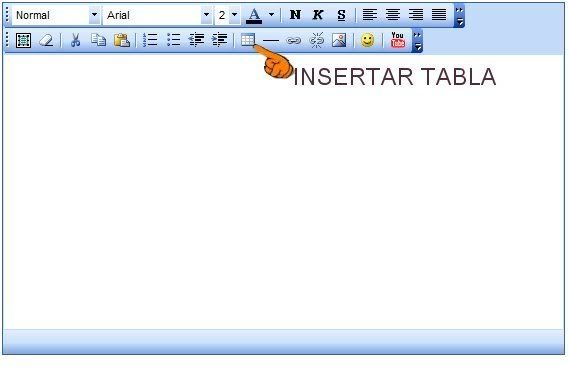
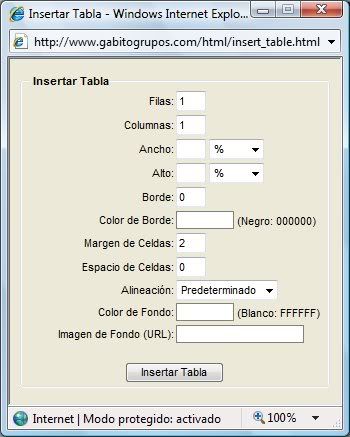
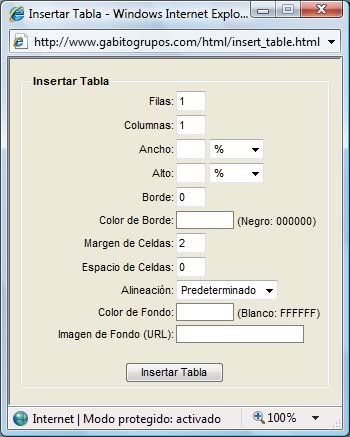
1.- Damos clic a insertar tabla
 
 
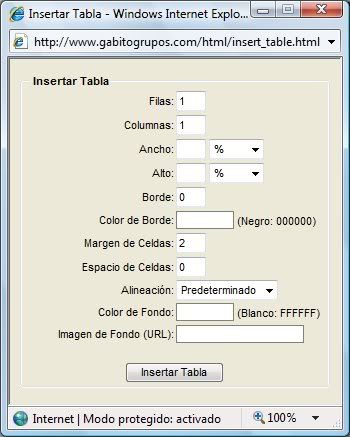
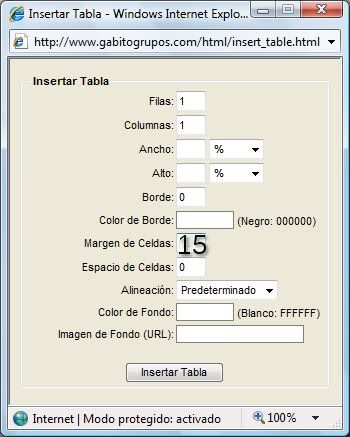
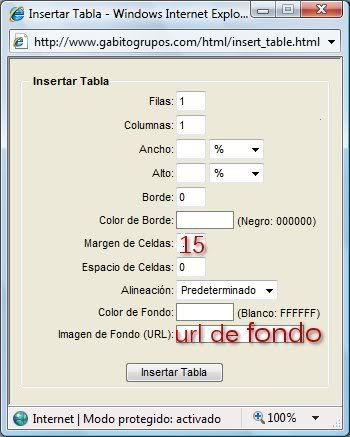
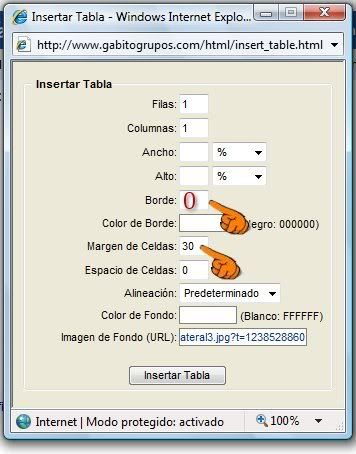
en la ventana que se abre colocamos la siguiente medidas
para la primera tabla
 
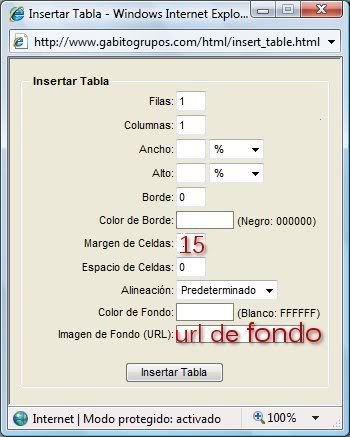
en imagen de fondo colocamos la direccion url
de esta textura


sin quitar el cursor, da de nuevo a inserta tabla
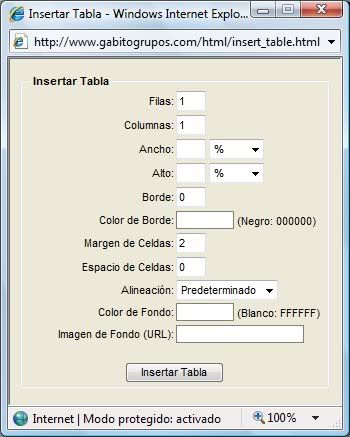
para hacer una segunda tabla
y colocas las siguientes medidas
 
 
en imagen de fondo colocas la direccion url
de esta textura
 
colocas el cursor dentro de esa tabla
da clic a la tecla retroceso
para hacer la proxima tabla que en este caso
es igual a la primera
 
colocas el cursor dentro de esa tabla, da a la tecla
retroceso y construye
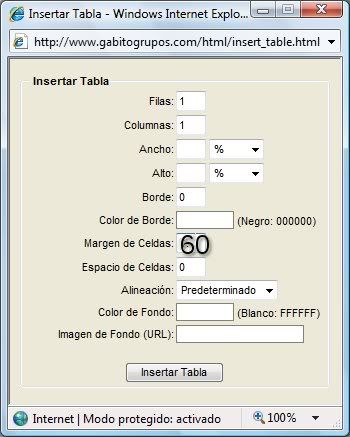
la proxima tabla con estas medidas
 
 
en imagen de fondo colocas la direccion
url de esta textura
 
colocas el cursor dentro de esa tabla
y hacemos otra tabla igual a la primera
colocamos el cursor dentro de esa tabla
y damos de nuevo a la tecla retroceso
y construimos otra tabla con las siguientes
medidas


en imagen de fondo colocamos la direccion
url de esta imagen
colocamos el cursor dentro de esa tabla y hacemos
otra tabla igual a la primera
 
volvemos a dar a la tecla retroceso
y hacemos otra tabla igual a la segunda
 
hacemos otra tabla igual a la primera
 
 
volvemos a dar a la tecla retroceso para
construir la ultima tabla con las siguientes medidas
y textura
 
 
en imagen de fondo colocamos
la direccion url de esta textura
 
por ultimo damos a cetrar en la ventana donde estamos
escribiendo para colocar la imagen de adorno,
damos clic en la montañita que esta al lado de la carita
insetar imagen y en la ventana que se abre
colocamos la direccion url de la imagen


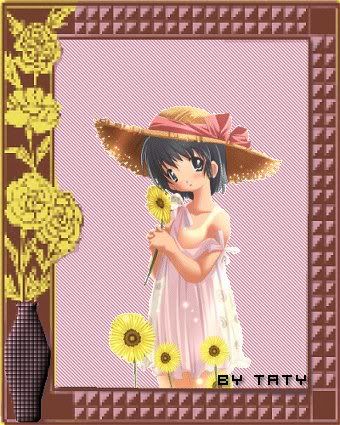
Hola este es el resutado de nuestro fondo, si tienes dudas no

temas en preguntar, puedes usar las texturas que mas

te gusten y combinarlas a tu modo,

con cariño para ti,


Taty


First  Previous  46 to 60 of 60  Next   Last  
Reply  Message 46 of 60 on the subject 
From: Taty Sent: 06/05/2009 04:01
Hola Soldelsur, gracias por tus palabras. y gracias doble por las lindas imagenes
que nos regalastes, puedes estar segura que las usaremos, con relacion a las practicas
sumate sin temor, no importa si al principio no te salen como deseas, luego le va agarrando
el paso, arriesgate a practicar asi se aprende y cuando tengas dudas pregunta sin temor,
que tengas una linda noche,
 
Taty

Reply  Message 47 of 60 on the subject 
From: Ximena777 Sent: 06/05/2009 04:14
Gracias Taty amiga, !!!!  tu me animas y yo me entusiasmo, !!! eres especial tqm
Ximena

Reply  Message 48 of 60 on the subject 
From: odalys Sent: 10/05/2009 01:29
GRACIAS SOLDELSUR POR ESAS BELLAS  IMAGENES Y TUS  BELLAS PALABRAS  SABES  HOY  LO INTENTARE   PUES ME  GUSTA MUCHO QUE DIOS TE BENDIGA 


Reply  Message 49 of 60 on the subject 
From: odalys Sent: 10/05/2009 03:06
 

chicaazul-1.gif picture by car-k_album


TEXTO AQUI

FondoporOdys.gif picture by Taty063


Reply  Message 50 of 60 on the subject 
From: beachys Sent: 15/05/2009 22:45


guitarra.gif picture by Beachysguitarra.gif picture by Beachysguitarra.gif picture by Beachys


felizdia.gif picture by Beachys

tonosmusicales.gif picture by Beachys

tqm.gif picture by Beachys


bmano-1.gif picture by Beachys


Reply  Message 51 of 60 on the subject 
From: beachys Sent: 25/05/2009 02:05
parte1layout.gif picture by firmasbeachys

0009floaties.gif picture by firmasbeachys0009floaties.gif picture by firmasbeachys0009floaties.gif picture by firmasbeachys0009floaties.gif picture by firmasbeachys0009floaties.gif picture by firmasbeachys0009floaties.gif picture by firmasbeachys

barragorjuss2-1.gif picture by firmasbeachys

barragorjuss-1.gif picture by firmasbeachys

0009floaties.gif picture by firmasbeachys0009floaties.gif picture by firmasbeachys0009floaties.gif picture by firmasbeachys0009floaties.gif picture by firmasbeachys0009floaties.gif picture by firmasbeachys0009floaties.gif picture by firmasbeachys

gorjussrosacorazonesbeachys.gif picture by firmasbeachys


Reply  Message 52 of 60 on the subject 
From: Soldelsur Sent: 27/05/2009 00:36
Odalys    Esto es super  bello, que linda queda hecha, que dios te bendiga  y podais hacer muchisimassss   y  dejo otra imagen, anoche lapuse  en entrega,  Danyella  me hizo mi firma,  os ponga la  niña esta tan Modosita  jajaj  de mongita,
  es chulisima, besos  Soldelsur
 
 
  womanwarrior.gif picture by car-k_album

Reply  Message 53 of 60 on the subject 
From: odalys Sent: 27/05/2009 00:56
GRACIAS  SOLDELSUR  SIEMPRE   TAN ESPECIAL   GUARDE  TU FIRMITA  SABES   ES MUY LINDA   TATY  VERONICA   Y TU ME  HACEN SIEMPRE  FIRMITAS   MUCHAS GRACIAS   QUE DIOS  TE BENDIGA   
ODYS
 
 
  womanwarrior.gif picture by car-k_album

Reply  Message 54 of 60 on the subject 
From: beachys Sent: 27/05/2009 02:35


felicidadesabuelita.gif picture by Beachys


Attachmentrtqm.gif picture by BeachysAttachment


babydust.gif picture by Beachys

nicolas.gif picture by Beachys


cump.gif picture by Beatrizcs


232740f177e85e7bfd7d86888ad8003d18a.gif picture by Beatrizcs


Reply  Message 55 of 60 on the subject 
From: odalys Sent: 27/05/2009 04:05
FELICIDADES BEACHYS  ERES UNA BELLA  Y JOVEN ABUELITA  QUE DIOS BENDIGA  AL BEBE 
ODYS
 

232740f177e85e7bfd7d86888ad8003d18a.gif picture by Beatrizcs


Reply  Message 56 of 60 on the subject 
From: ARTESANA Sent: 30/05/2009 10:24
OS  FELICITO A TODAS . SOIS UNAS ARTISTAS POR MAS QUE LO INTENTO NO ME SALE NADA.PRECIOSOS TODOS LOS TRABAJOS.
QUE TORPE SOY.
FELICIDADES

Reply  Message 57 of 60 on the subject 
From: Anyta v Sent: 23/06/2009 20:42
Una consulta...me podre llevar el tutorial a mi grupo...desde ya muchas gracias...Any!!!

Reply  Message 58 of 60 on the subject 
From: veronica0 Sent: 23/06/2009 21:43
SI, TE LOS PUEDES LLEVAR, CONSERVANDO LA AUTORIA DE TATY.
SALUDOS
VERO

Reply  Message 59 of 60 on the subject 
From: Anyta v Sent: 23/06/2009 22:18
Muchisimas gracias!!!!!


Reply  Message 60 of 60 on the subject 
From: veronica0 Sent: 13/07/2009 16:25
SUBIENDO


First  Previous  46 a 60 de 60  Next   Last  
Previous subject  Next subject
 
©2025 - Gabitos - All rights reserved