Home  |  Contact  

Email:

Password:

Sign Up Now!

Forgot your password?

MALAGUEÑOS SOLITARIOS Y AMIGOS
 
What’s New
  Join Now
  Message Board 
  Image Gallery 
 Files and Documents 
 Polls and Test 
  Member List


 ◄NUEVO DESAFÍO - 31► 
  
 ◄NUEVO TUTO ZARITA - DE NORALY► 


 ◄GENERAL► 
  
 ◄RETOS PSP► 
  
 ◄TUBES MISAE► 
  
 ◄EL DESAFIO► 


 ◄REGALOS POR PARTICIPACION► 
  
 ◄ME PRESENTO 
 ◄NUESTRO CHAT 
 ◄ZARA PARA SIEMPRE 
 ◄HERME POR SIEMPRE 
 ◄JULIETA POR SIEMPRE 
  
 ◄WEB DE MISAE► 
 ◄TUTOS MISAE► 
 ◄TUTOS MISAE -2► 
 ◄TUTOS FILTROS► 
 ◄TUTOS FILTROS-2► 
  
 ◄ADMINISTRACCIÓN► 


 ◄ BUZONES ► 
  
 ◄ROBO DE BANDA 
 ◄REFLEXIONES 
 ◄SONRIE 
 ◄CUMPLEAÑOS 
 ◄POEMAS 
 ◄POEMAS DE NUESTRA AUTORIA 
  
 ◄MI MALAGA 
 ◄NUESTRA MUSICA 
 ◄TUS RECETAS 
 ◄FONDOS MISAE 
 ◄FONDOS 
 ◄GIFTS 
  
 ◄DISEÑOS MISAE 
  
 ◄OFRES FIRMAS 
 ◄RECOGE FIRMAS 


 ◄AULA PSP 
 ◄TUTOS PSP 
 ◄PRINCIPANTES 
 ◄MEDIOS 
 ◄AVANZADOS 
 ◄AVANZADO SUPERIOR 
 ◄APRENDIENDO CON FILTROS 
 ◄RECURSOS PSP 
 ◄EXPOSICION PSP 
 ◄TUTOS ALUMNOS 
  
 ◄TUTOS MISAE 
 ◄TUTOS SUIZA BELLA 
 ◄TUTOS GUGU 
 ◄TUTOS EMILIETA 
 ◄PERMISOS TUTORAS 


 ◄EXPOSICION TAG A 6 MANOS 
 ◄GALERIA ARTISTAS 
  
 ◄TALLER DE FONDOS 
 ◄TUTOS FONDOS 
 ◄MATERIAL FONDOS 
  
 ◄TUTOS DIVERSOS 
 ◄ENVIA TU TUTO 
 ◄TODO NICK 
  
 ◄NUESTROS BANNERS 
 ◄COMUNIDADES AMIGAS 


  Tools
 
۞ RETO PSP - CERO FILTRO ۞: RETO 0 FILTRO # 6 ===YULS===
Choose another message board
Previous subject  Next subject
Reply  Message 1 of 7 on the subject 
From: Yulsmarazul  (Original message) Sent: 09/04/2015 00:54
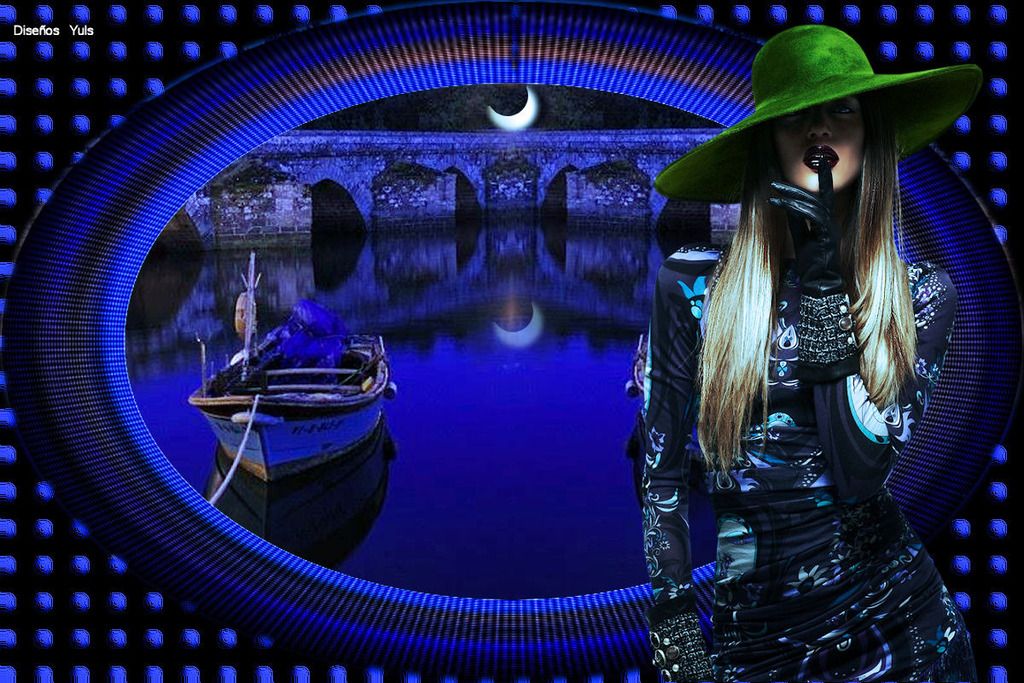
Bueno hice  un top.
 
Pegue el paisaje lo agrande, duplique capa, le di espejo y  fusione  hacia abajo, duplique  capa y  le  di desenfoque  gaussiano
 luego con la  herramienta selección  lo  baje  hasta  quedar un rectángulo, le aplique semitonos y  luego  le di coordenadas polares,
 aplique color negro y en la patre  del  circulo que  habia quedado  en la capa anterior  le  borre el  centro para  que se viera el paisaje,
luego  aplique a las esquinas que  me quedaron  textura textil, enseguida topografia y  le ajuste  el  color en azúl porque  se  me  hizo  muy  fúnebre,
 le  di  luz al  sombrero  y a la cara  de  la chica, y  la luna  se la  hice  con el pelo  de la chica con selección de circulo y  desenfoque  gausiano 
luego con seleccion de circulo una  ves  más le  mordí  un pedazo para  que  quedara la  media luna  duplique  capa y acomode la  luna enel agua bajando  la opacidad
y le  di  equilibrio  de  color y  creo  fue  todo.



First  Previous  2 to 7 of 7  Next   Last  
Reply  Message 2 of 7 on the subject 
From: zara Sent: 09/04/2015 07:13
PUES TE QUEDO PRECIOSO,
FELICIDADES....ZARA

Reply  Message 3 of 7 on the subject 
From: MISAE Sent: 09/04/2015 07:27
Ohhhhhhhhhhhhhh pues te ha quedado divino Yulsssss, muy creativo y original, enhorabuena wapaa..!
Misae

Reply  Message 4 of 7 on the subject 
From: GUGU Sent: 09/04/2015 11:25
OHHHHHHHHHHHHHHHHHHHHHHHH! PRECIOSO TRABAJO YULS, DIGNO DE UNA ARTISTA
FELIZ DIA
GUGU

Reply  Message 5 of 7 on the subject 
From: Vestal Sent: 09/04/2015 18:38
Eres una artistaza ¡ precioso !
Reme

Reply  Message 6 of 7 on the subject 
From: AZUCAR845 Sent: 09/04/2015 18:45
Wowwwwwwwww pero que bonito te ha quedado Yuls......Bellisimo......Un abrazo...Dina

Reply  Message 7 of 7 on the subject 
From: Yulsmarazul Sent: 10/04/2015 01:49
Gracias  amigas es  un gusto  tenerles  por aquí,  buenas  noches  que  descansen!!


First  Previous  2 a 7 de 7  Next   Last  
Previous subject  Next subject
 
©2025 - Gabitos - All rights reserved