|
|
=====MATERIAL PARA FONDOS=====: ===CONFIGURACION PARA LAYOUT
Triar un altre plafó de missatges |
|
|
| De: CryBaby (Missatge original) |
Enviat: 19/11/2020 05:19 |
PNG Optimizer
If you have been saving your tags as white-backed JPEGs, then I hope you'll consider changing the way you save your tags and use PNG format instead. A tag saved in PNG format has a transparent background and displays beautifully over most (if not all) solid-colored or patterned backgrounds. I save my tags exclusively as PNG unless the tag is animated, and then I use GIF.
Before I learned about the benefits of PNG format, I saved my tags in JPEG format. In addition to losing image transparency, JPEG format adds "speckling" to the edges of the image and degrades the quality of masks and colors such as reds and pinks. If you take pride in your tag making, then I recommend switching from JPEG format to PNG format. Tags saved in PNG format will usually have a larger file size, but I think the image quality is worth the trade off in file size.
A Note About Image Hosting
If you are using Servimg to upload your tags for tag delivery, then you may have noticed that some of your PNG tags have been converted to JPEG. Any image in excess of 1mb gets converted automatically to JPEG to reduce the file size but it also reduces the image quality and eliminates the transparency.
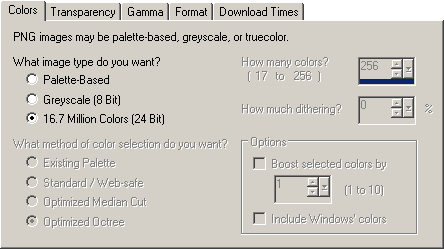
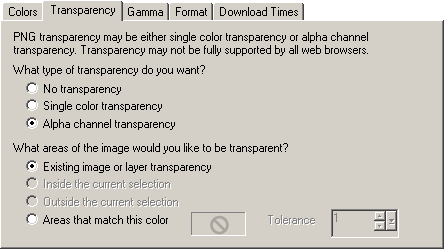
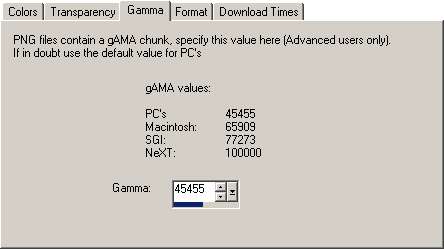
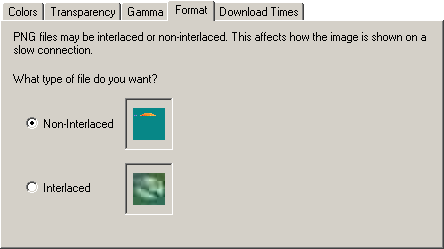
To save a tag as a PNG, I use the PNG Optimizer. Since I use it so much, I have added a shortcut button  to my toolbar. If you don't have a shortcut button, you can go through the menu: File > Export > PNG Optimizer. These are the settings that I use when I save a tag as a transparent PNG. to my toolbar. If you don't have a shortcut button, you can go through the menu: File > Export > PNG Optimizer. These are the settings that I use when I save a tag as a transparent PNG.
On the Colors tab: 16.7 Million Colors (24 Bit)
On the Transparency tab: Alpha channel transparency, Existing image or layer transparency
On the Gamma tab: 45455 (for PC's)
On the Format tab: Non-interlaced
The Download Times tab is informational. |
|
|
|
|
 Primer
Anterior
Sense resposta
Següent
Primer
Anterior
Sense resposta
Següent
 Darrer
|
|
|
| |
|
|
©2025 - Gabitos - Tots els drets reservats | |
|
|


 Tema anterior